【Zラヴ】アーティストフォロー/“Zラヴ”楽曲お気に入り追加キャンペーン/Follow the Artist & "Z LOVE" Favorite Campaign

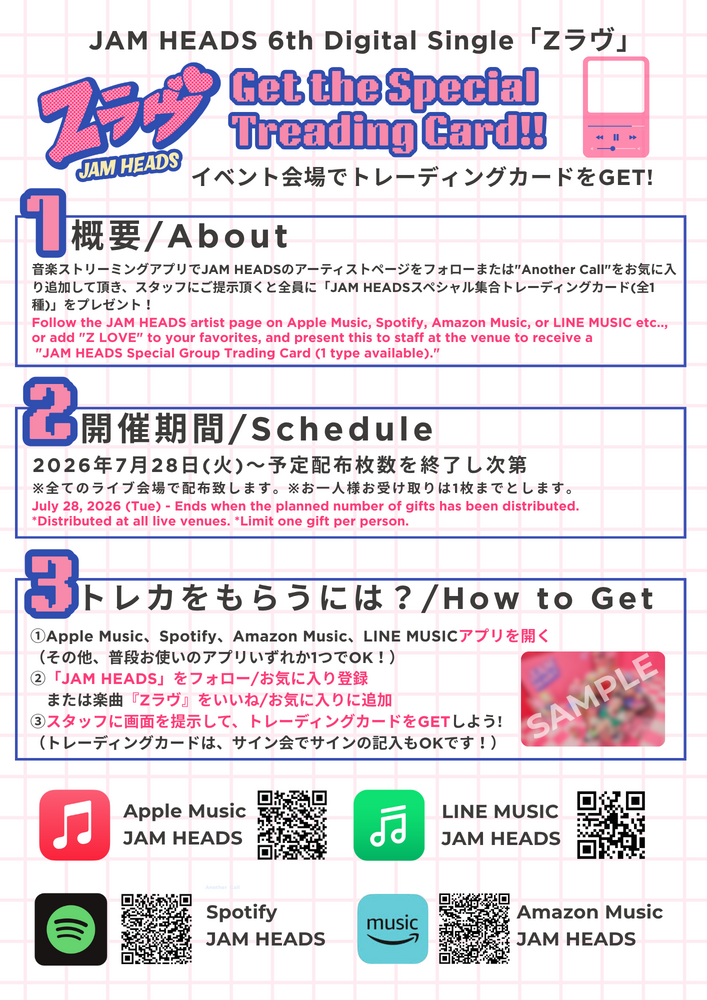
JAM HEADS 6th Digital Single"Zラヴ"のリリースを記念して、Apple Music、Spotify、Amazon Music、LINE MUSICのいずれかでJAM HEADSのアーティストページをフォローまたは"Z
ラヴ"をお気に入り追加して頂き、ライブ会場にてスタッフにご提示頂くと全員に「JAM HEADSスペシャル集合トレーディングカード(全1種)」をプレゼント致します。
以下の注意事項をお読み頂き、ぜひライブ会場にて手に入れて下さい!
▼キャンペーン期間
2026年7月28日(火)〜予定配布枚数を終了し次第
※全てのライブ会場で配布致します。
※お一人様お受け取りは1枚までと致します。
▼プレゼント内容
JAM HEADSスペシャル集合トレーディングカード(全1種)
▼JAM HEADSアーティストページ
Apple Music: https://music.apple.com/jp/artist/jam-heads/1694628750
Spotify: https://open.spotify.com/artist/1OgHwRL0NhiAg6S2E8kQIU?si=uG1HkbmXSdO_rYoGHxmsCg
Amazon Music: https://music.amazon.co.jp/artists/B0C9DP37XX/jam-heads?marketplaceId=A1VC38T7YXB528&musicTerritory=JP&ref=dm_sh_MDgcSKrcJALEK37Bbyt9K1dh5
LINE MUSIC: https://lin.ee/vLnP36k
▼”Zラヴ”楽曲ページ
https://jamheads.lnk.to/ZLove
▼JAM HEADS アーティストフォロー方法
■Apple Music
(1) Apple MusicでJAM HEADSのアーティストページを開き、右上の☆マークを押す
(2) お気に入り登録したことが分かる画面をライブ会場にてスタッフに提示する
■Spotify
(1) SpotifyでJAM HEADSのアーティストページを開き、「フォローする」ボタンを押す
(2) フォローしたことが分かる画面をライブ会場にてスタッフに提示する
■Amazon Music
(1) Amazon MusicでJAM HEADSアーティストページを開き「フォロー」ボタンを押す
(2) フォローしたことが分かる画面をライブ会場にてスタッフに提示する
■LINE MUSIC
(1) LINE MUSICでJAM HEADSのアーティストページを開き右上の♡マークを押す
(2) いいねしたことが分かる画面をライブ会場にてスタッフに提示する
▼"Zラヴ"楽曲お気に入り追加方法
■Apple Music
(1) Apple Musicでアーティストページから”Zラヴ"をタップし、☆マークを押す
(2) お気に入り追加したことが分かる画面をライブ会場にてスタッフに提示する
■Spotify
(1) Spotifyでアーティストページから”Zラヴ"をタップし、+マークを押す
(2) お気に入り追加したことが分かる画面をライブ会場にてスタッフに提示する
■Amazon Music
(1) Amazon Musicでアーティストページから”Zラヴ"をタップし、♡マークを押す
(2) お気に入り追加したことが分かる画面をライブ会場にてスタッフに提示する
■LINE MUSIC
(1) LINE MUSICでアーティストページから”Zラヴ"をタップし、♡マークを押す
(2) お気に入り追加したことが分かる画面をライブ会場にてスタッフに提示する
【Z LOVE】Follow the Artist / "Z LOVE" Favorite Campaign
To celebrate the release of JAM HEADS' 6th Digital Single "Z LOVE," follow the JAM HEADS artist page or add "Z LOVE" to your Favorites on Apple Music, Spotify, Amazon Music, or LINE MUSIC, then show the confirmation screen to our staff at any JAM HEADS live venue to receive a JAM HEADS Special Group Trading Card (1 Design)!
Please read the details below and don't miss your chance to receive this exclusive gift at our live shows!
▼ Campaign Period
July 28, 2026 (Tue) – While supplies last
・Available at all JAM HEADS live venues.
・Limited to one trading card per person.
▼ Gift
JAM HEADS Special Group Trading Card (1 Design)
▼ JAM HEADS Artist Pages
Apple Music
https://music.apple.com/jp/artist/jam-heads/1694628750
Spotify
https://open.spotify.com/artist/1OgHwRL0NhiAg6S2E8kQIU
Amazon Music
https://music.amazon.co.jp/artists/B0C9DP37XX/jam-heads
LINE MUSIC
https://lin.ee/vLnP36k
▼ "Z LOVE" Song Page
▼ How to Follow the JAM HEADS Artist Page
Apple Music
(1) Open the JAM HEADS artist page in Apple Music.
(2) Tap the ☆ (Favorite) icon in the upper-right corner.
(3) Show the confirmation screen at the live venue.
Spotify
(1) Open the JAM HEADS artist page in Spotify.
(2) Tap "Follow."
(3) Show the confirmation screen at the live venue.
Amazon Music
(1) Open the JAM HEADS artist page in Amazon Music.
(2) Tap "Follow."
(3) Show the confirmation screen at the live venue.
LINE MUSIC
(1) Open the JAM HEADS artist page in LINE MUSIC.
(2) Tap the ♡ (Like) icon.
(3) Show the confirmation screen at the live venue.
▼ How to Add "Z LOVE" to Your Favorites
Apple Music
(1) Open "Z Love" from the JAM HEADS artist page.
(2) Tap the ☆ (Favorite) icon.
(3) Show the confirmation screen at the live venue.
Spotify
(1) Open "Z Love" from the JAM HEADS artist page.
(2) Tap the + (Add to Library) button.
(3) Show the confirmation screen at the live venue.
Amazon Music
(1) Open "Z Love" from the JAM HEADS artist page.
(2) Tap the ♡ (Favorite) icon.
(3) Show the confirmation screen at the live venue.
LINE MUSIC
(1) Open "Z Love" from the JAM HEADS artist page.
(2) Tap the ♡ (Like) icon.
(3) Show the confirmation screen at the live venue.